Willy: A Handwritten Font for Modern Web Design
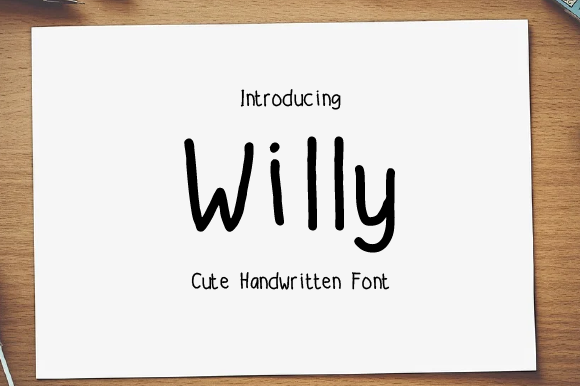
In the crowded landscape of digital interfaces, establishing a distinct brand voice often comes down to the smallest details. As web designers and UI creators, we constantly search for typefaces that balance personality with usability. Enter Willy, a sweet and friendly handwritten font that brings an organic touch to digital experiences. Unlike rigid geometric sans serif fonts or overly formal serif fonts, Willy offers a natural rhythm that feels approachable and human. This unique style makes it incredibly fitting for a large pool of designs, from boutique online stores to personal coaching websites.
The Personality of a Digital Typeface
When selecting a premium font for a project, the visual characteristics must align with the brand's core values. Willy is not just another script font; it is a display font designed to convey warmth and authenticity. Its strokes mimic the fluidity of actual handwriting, yet they maintain enough structure to remain legible on screens. This balance is crucial for modern typography. In an era where users scan content rapidly, a font that feels too messy can hinder readability, while one that is too stiff can feel impersonal. Willy strikes the perfect middle ground, offering a creative font option that invites users to engage without causing visual fatigue.
The natural and unique style of Willy allows it to stand out in hero sections and landing pages. When a visitor lands on a homepage, the headline is the first element that communicates tone. Using Willy here can instantly signal that the brand is friendly, accessible, and human-centric. Whether you are building a portfolio site for a creative entrepreneur or a product page for a handmade goods shop, this typeface sets an emotional connection before the user even reads the body copy.
Strategic Placement in Web Layouts
While Willy is versatile, understanding where to deploy it within a layout is key to maintaining visual hierarchy. It excels as a display font for headers, section titles, and short phrases. For instance, on a course sales page, using Willy for the main course title can make the learning journey feel more personal and less academic. Similarly, on a blog header, it adds an editorial design flair that distinguishes the publication from generic news sites.
However, caution is required when applying Willy to body text. Due to its handwritten nature, long paragraphs can become difficult to read, especially on smaller mobile screens. Instead, reserve Willy for high-impact areas like call-to-action buttons, logo text, or decorative accents. On an online store banner, a "Shop Now" button styled with Willy can feel like a personal invitation rather than a robotic command. This subtle shift in tone can significantly impact conversion rates by making the interaction feel more intuitive and welcoming.
Enhancing Brand Identity and Trust
A consistent online identity is built on the cohesive use of design assets. Willy serves as a powerful tool for strengthening brand identity across various digital touchpoints. For SaaS founders or startup teams looking to soften their corporate image, integrating this handwritten font into their dashboard UI or welcome emails can humanize the technology. It suggests that real people are behind the software, fostering trust and loyalty.
Consider a coaching website where the goal is to build rapport. Using Willy for testimonials or key value propositions reinforces the message of personal guidance. The font's friendly demeanor reduces the psychological distance between the service provider and the client. In contrast, a strictly geometric sans serif might feel too cold for such an intimate service. By choosing Willy, designers can craft a narrative that resonates emotionally with the target audience.
Optimizing Readability Across Devices
One of the primary challenges with script fonts in web design is ensuring they perform well across responsive layouts. Willy is engineered to be adaptable, but designers must still pay attention to sizing and background contrast. On mobile devices, screen real estate is limited, and small text can quickly become illegible. When using Willy for mobile navigation labels or footer links, ensure the font size is generous enough to maintain clarity.
Background choice also plays a critical role. While Willy looks stunning against light backgrounds, it can shine equally well on dark mode interfaces if the color contrast is managed correctly. Avoid placing the font over busy image overlays where the intricate strokes might get lost. If used on an image, consider adding a subtle shadow or a solid backdrop behind the text to enhance legibility. These technical considerations ensure that the aesthetic appeal of the font does not compromise the user experience.
Mastering Font Pairing for Web Projects
To create a balanced and professional look, pairing Willy with complementary typefaces is essential. Since Willy is a decorative display font, it pairs beautifully with simple, clean sans serif fonts for body copy. This combination creates a clear visual hierarchy where the headlines grab attention and the body text remains easy to scan. For example, pairing Willy with a neutral sans serif like Roboto or Open Sans provides a modern typography foundation that works for almost any industry.
For a more sophisticated or editorial digital identity, consider pairing Willy with a classic serif font. This juxtaposition of a playful handwritten style with a traditional serif can evoke a sense of curated elegance, perfect for lifestyle blogs or high-end boutique brands. The key is to let Willy lead the conversation in headings while the secondary font supports the reading experience. Always test these pairings in your actual design environment to ensure the rhythm flows naturally across different sections of the page.
Licensing and Technical Considerations
Before implementing Willy in any commercial project, it is vital to review the licensing terms. As a commercial font, the license dictates how you can use the typeface on websites, client projects, and digital templates. Ensure you have the appropriate webfont license if you plan to embed the font via CSS for public-facing sites. This applies to online stores, landing pages, and branded web content alike. Using a font without the correct license can lead to legal complications and disrupt your business operations.
Additionally, check the included file formats and styles. Most modern web projects require WOFF2 and WOFF files for optimal performance and browser compatibility. Verify if the package includes multiple weights or alternates that allow for further customization. Multilingual support is another factor to consider if your target audience spans different regions. Ensuring that Willy supports the necessary character sets will prevent broken text displays and maintain the integrity of your design.
Bringing Imagination to Life
Ultimately, the only limit with Willy is your imagination. Whether you are designing social media graphics, packaging design concepts, or complex web applications, this font offers a fresh perspective. It transforms standard digital interactions into memorable brand experiences. By thoughtfully integrating Willy into your workflow, you can elevate your projects beyond the ordinary, creating spaces that feel alive, engaging, and uniquely yours. In the world of web design, where every pixel counts, choosing a font that speaks directly to the heart of your audience can be the difference between a good design and a great one.